🆔 What is SSO ID? – Rajasthan SSO Portal (राजस्थान SSO ID क्या है?)
SSO ID stands for Single Sign-On Identity — a unique login credential issued by the Government of Rajasthan. One SSO ID and password gives access to 100+ state government services including e-Mitra, land records, pensions, and scholarships through the RajSSO portal at sso.rajasthan.gov.in.
Instead of maintaining separate accounts for each government service, it acts as a master key — one username and password grants access to e-Mitra, employment portals, scholarship applications, land records, pension services, and many more Rajasthan government platforms. The portal is managed by the Department of IT & Communication, Government of Rajasthan.
Who Can Create an SSO ID?
The Rajasthan SSO portal allows three categories of users to perform SSO Registration:
| Category | Required Identification | Who is Eligible? |
|---|---|---|
| 👤 Citizen | Jan Aadhaar, Google Account, Facebook | All Rajasthan residents |
| 🏭 Udyog (Business) | BRN, Udyog Aadhaar Number | Business owners & industries |
| 🏛️ Govt. Employee | SIPF ID & Password | Rajasthan state government staff |
📝 SSO Registration – How to Create New SSO ID (Step-by-Step)
Follow this complete SSO Registration guide to create your new SSO ID on the Rajasthan SSO portal. This process is free and takes approximately 5 minutes.
Visit the Official RajSSO Portal
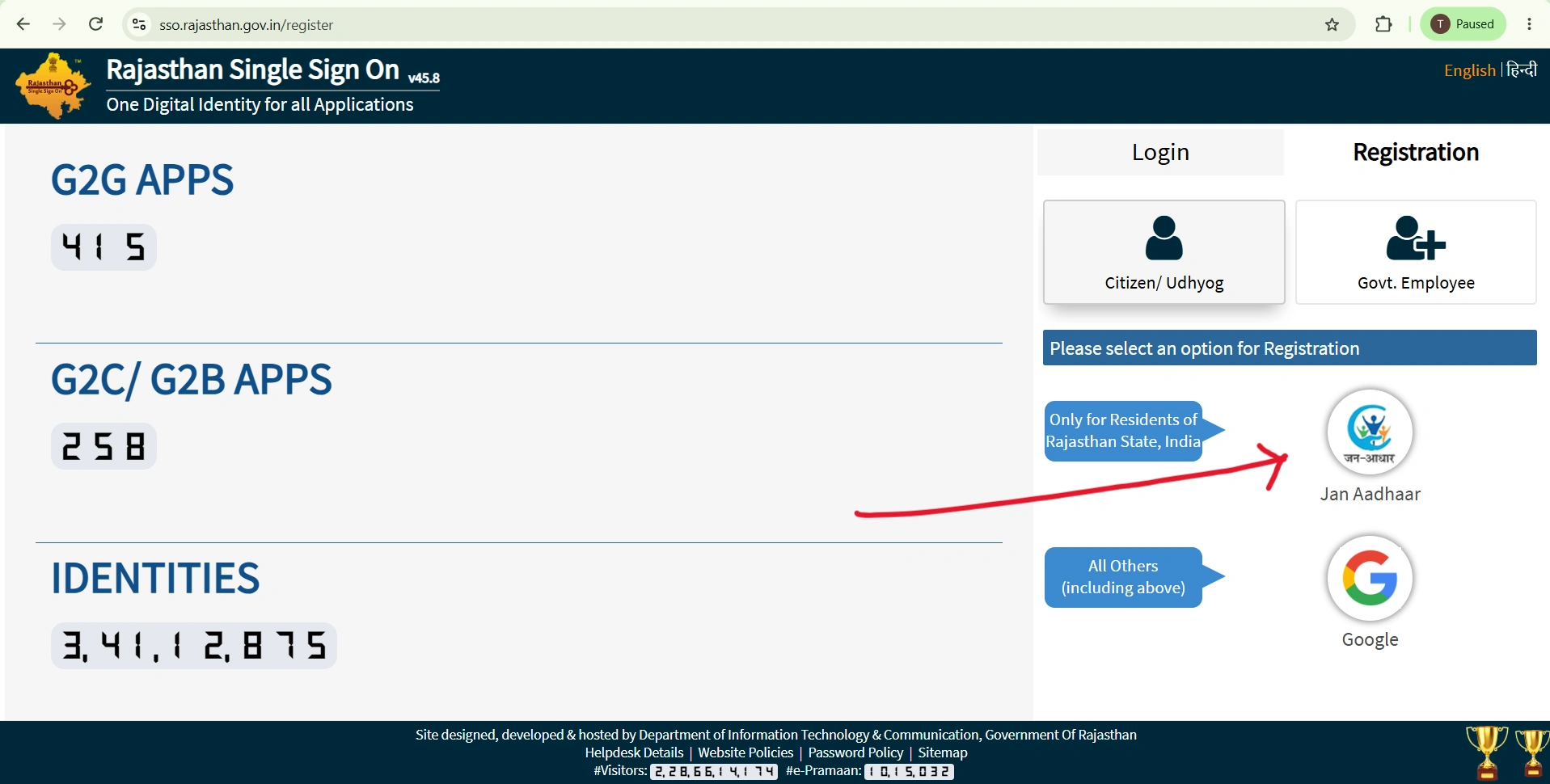
Open your browser and go to sso.rajasthan.gov.in. Click on the "Registration" tab visible on the right side of the SSO Login page.
Select Your User Category
Choose the appropriate category for your SSO Registration: Citizen (for Rajasthan residents), Udyog (for business/industry), or Govt. Employee (for state government staff).
Enter Your Identification Details
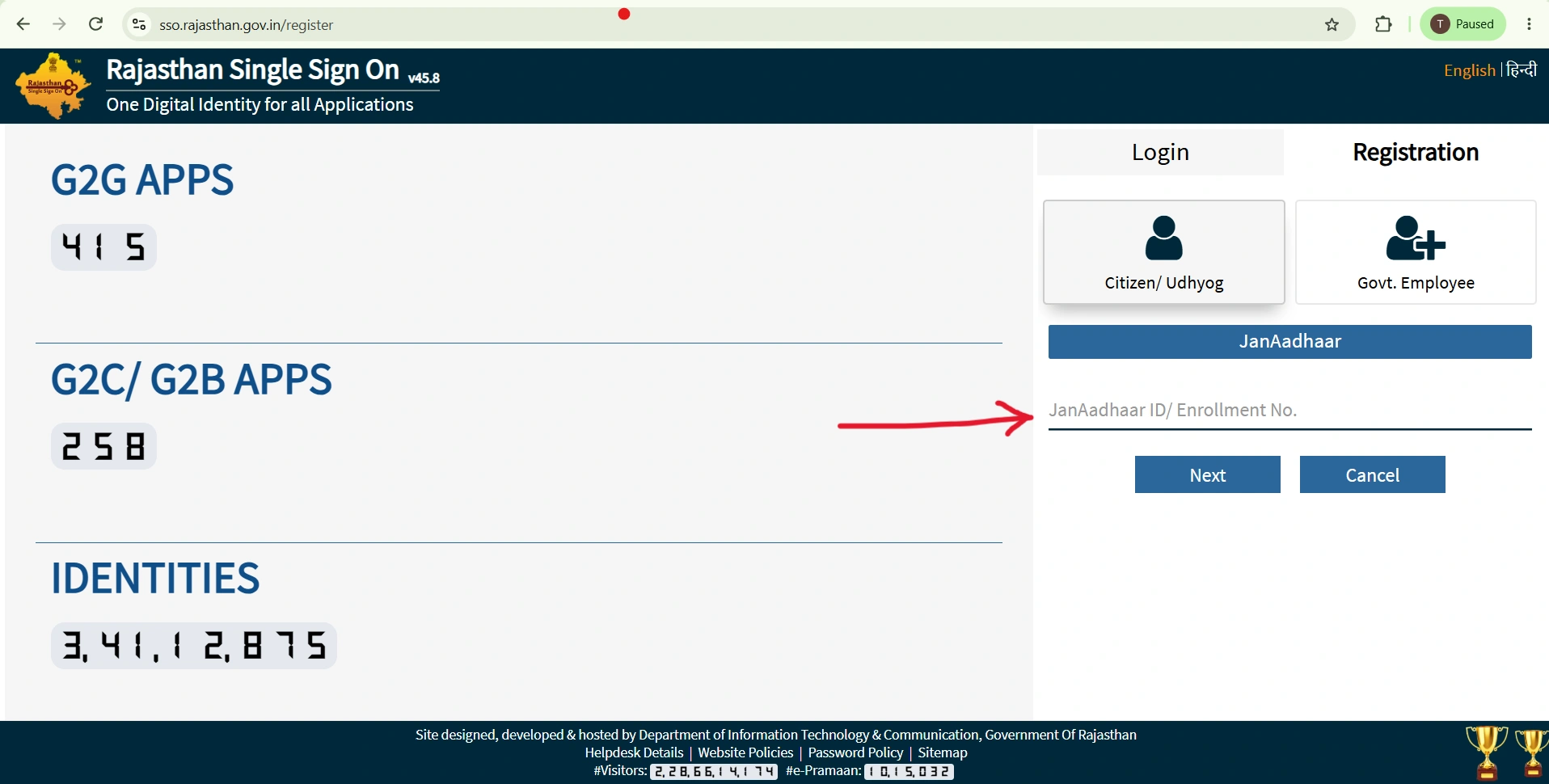
Citizens: Enter your Jan Aadhaar number and select your name. Udyog: Enter your BRN or Udyog Aadhaar number. Govt. Employee: Enter your SIPF username and password.
Verify via OTP
An OTP (One-Time Password) will be sent to your registered mobile number linked with your Jan Aadhaar or SIPF account. Enter the 6-digit OTP to verify your identity.
Create Your SSO ID & Password
Set a unique SSO ID (username) and a strong password. Your password must include uppercase letters, numbers, and special characters. Click Register to complete your SSO Registration.
🔑 SSO Login – How to Login to Rajasthan SSO Portal
After completing SSO Registration, follow these steps for SSO ID Login on the RajSSO portal:
Open the Rajasthan SSO Login Page
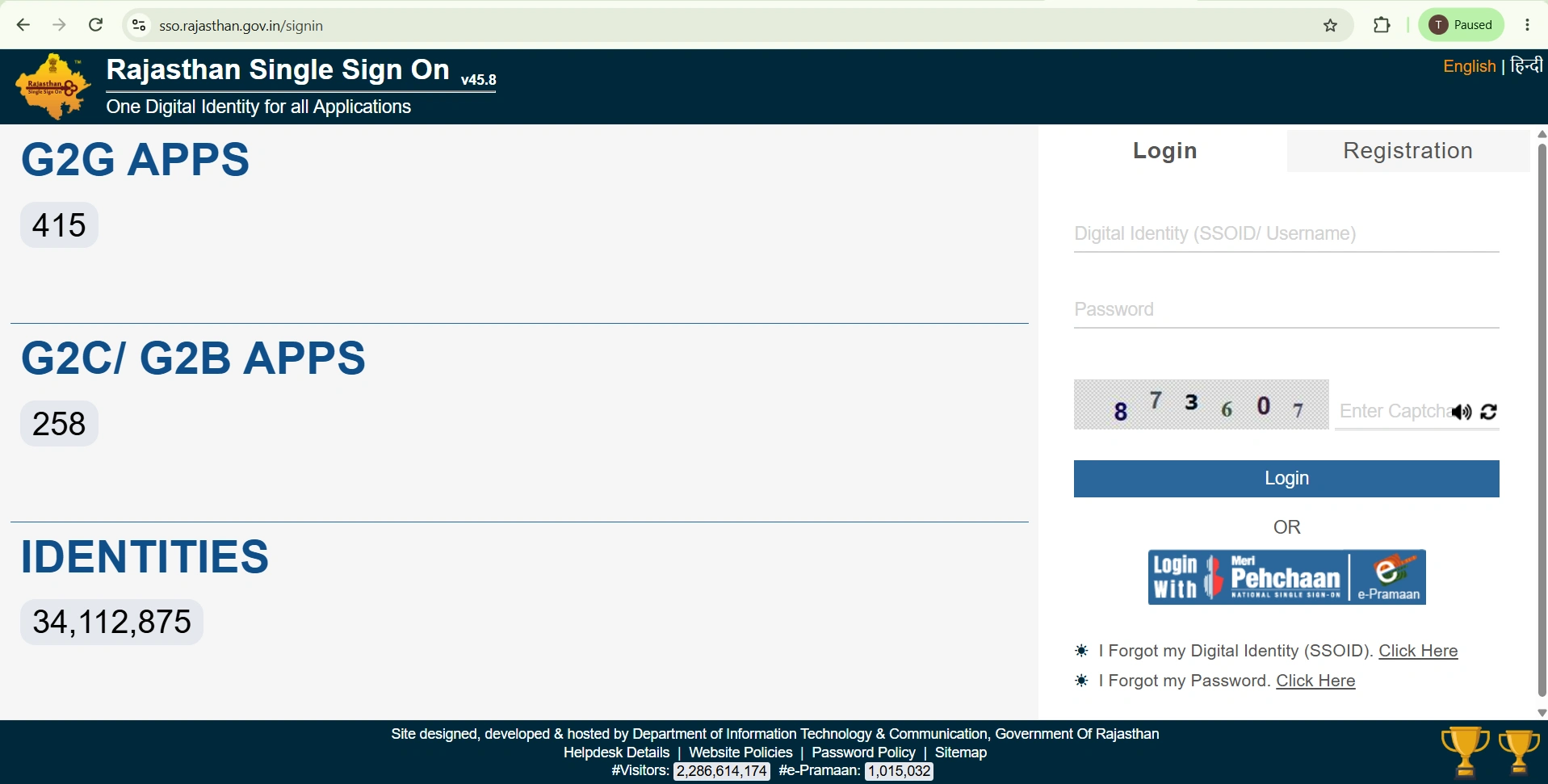
Navigate to sso.rajasthan.gov.in/signin in your browser. This is the official SSO Login page.
Enter Your SSO ID & Password
Type your registered SSO ID (username) in the first field and your password in the second field.
Enter Captcha & Click Login
Fill in the captcha code displayed on screen. Click the "Login" button to complete your SSO ID Login and access the Rajasthan SSO dashboard.
sso.rajasthan.gov.in before entering your
SSO ID credentials. Never share your SSO Login
password with anyone. The official Rajasthan SSO portal always uses a
.gov.in domain.
🔄 Forgot SSO ID Password? – Reset Guide
If you've forgotten your SSO Login password, follow these steps to reset it on the Rajasthan SSO portal:
- Visit sso.rajasthan.gov.in/signin and click "Forgot Password".
- Enter your SSO ID and registered email address or mobile number.
- Complete the captcha and click Submit.
- Enter the 6-digit OTP sent to your registered mobile/email.
- A default password will be sent to you. Use it for SSO Login, then set a new password.
Forgot SSO ID? Click "Forgot SSO ID" on the login page. You can recover your SSO ID using Jan Aadhaar, Aadhaar number, or your linked Google account.
🏛️ How to Merge SSO ID in Rajasthan SSO Portal: Step-by-Step Guide
If you have duplicate accounts on the Rajasthan SSO portal (such as a personal Citizen ID and an official Government Employee ID), you can merge them into a single primary SSO ID. Follow these accurate steps to complete the consolidation process safely:
- Visit the official login portal at sso.rajasthan.gov.in/signin.
- Enter your secondary SSO ID (the Citizen account you wish to deactivate/merge) and password.
- Click on the Pencil icon (Edit Profile) located in the top navigation menu.
- Scroll down to the bottom of your profile page and click "Deactivate Account", then confirm with YES.
- Enter the 6-digit OTP sent to your registered mobile number and click Verify.
- Select the "Merge SSO ID" option from the prompt instead of standard deletion.
- Enter your primary Government Employee SSO ID (or Employee Code / SAN) into which you want to merge your data.
- Review the details and click Submit. A confirmation message will be displayed upon successful account mapping.
📝 How to Complete One Time Registration (OTR) in SSO Rajasthan: Step-by-Step Guide
The One Time Registration (OTR) process on the Rajasthan SSO portal allows job applicants to register their personal and educational details once to apply for multiple government vacancies. Follow these steps to complete your OTR:
- Visit the official portal at sso.rajasthan.gov.in/signin and log in with your SSO ID and password.
- Under the G2C (Government to Citizen) apps section, click on the "Recruitment Portal" icon.
- Click on the "One Time Registration (OTR)" tab located in the top menu of the dashboard.
- Select whether you are a resident of Rajasthan and choose your preferred verification method (Jan Aadhaar, Aadhaar Card, or SSO Profile).
- Fetch your details via OTP verification. Your name, date of birth, gender, and father's name will auto-populate based on your selected ID.
- Verify your email address and active mobile number using OTP, then upload the required identity/qualification documents (such as your 10th marksheet or photo ID).
- Review all fetched details carefully and click "Verify OTR" or "Final Submit".
- Complete the one-time OTR fee payment (if applicable) through the online payment gateway to generate your unique OTR Number.
Need Assistance with OTR? If you face any issues while fetching details or verifying OTP, you can reach out to the official recruitment helpdesk at 0141-2925554 or email helpdesk.sso@rajasthan.gov.in.
🏛️ Services Available on Rajasthan SSO (RajSSO) Portal
After SSO ID Login, you get access to over 100 Rajasthan SSO services. Here are the most popular ones available through the RajSSO portal:
e-Mitra
Government certificates, bill payments & more
Employment Exchange
Job registration & employment services
Scholarship Portal
Apply for state scholarships online
Land Records (Apna Khata)
View & download land records online
Pension Services
Old age, widow & disability pensions
Jan Aadhaar
Family ID card enrollment & services
Chiranjeevi Health
Health insurance scheme enrollment
Rajasthan Sampark
Grievance redressal portal
BPAS
Building plan approval system
GST Portal
GST registration & filing services
Arms License
Arms license application & renewal
e-Learning
Online education & skill development
📊 Rajasthan SSO Portal – Quick Reference
| Portal Name | Rajasthan Single Sign-On (RajSSO) |
| Official Website | sso.rajasthan.gov.in |
| Login Page | sso.rajasthan.gov.in/signin |
| Registration | sso.rajasthan.gov.in/register |
| Managed By | Department of IT & Communication, Govt. of Rajasthan |
| Beneficiaries | Citizens, Businesses (Udyog), Govt. Employees |
| Total Services | 100+ e-Governance Services |
| Registration Fee | Free (No charges) |
| Helpdesk Phone | 0141-5123717 / 0141-5153222 |
| Toll-Free Number | 1800-180-6565 |
| Email Support | helpdesk.sso@rajasthan.gov.in |
⚙️ SSO Login Problems & Troubleshooting
Facing issues with SSO ID Login? Here are common Rajasthan SSO problems and their solutions:
❌ "Password Expired" Error
Click Continue on the error prompt, verify via OTP to your mobile, and set a new password. This is a routine security measure by the RajSSO portal.
📱 OTP Not Received
- Ensure your registered mobile is active and has network signal.
- Check spam/junk folder for email OTPs.
- Wait 2-3 minutes before requesting a new OTP.
- Contact SSO helpdesk at 0141-5123717 if the issue persists.
🌐 Portal Not Loading
- Clear browser cache and cookies.
- Try Chrome, Firefox, or Edge browser.
- Use Incognito/Private mode.
- Verify your device's date and time settings are correct.
🔒 Account Locked After Multiple Failed Attempts
If your SSO ID gets locked after multiple wrong password entries, wait 30 minutes and try again. Alternatively, use the "Forgot Password" option to reset your credentials immediately.
❓ Frequently Asked Questions (FAQ) – SSO ID & Rajasthan SSO
SSO ID (Single Sign-On ID) is a unique digital identity issued by the Government of Rajasthan through the RajSSO portal (sso.rajasthan.gov.in). It allows citizens, businesses, and government employees to access 100+ e-governance services using a single SSO Login credential.
Visit sso.rajasthan.gov.in, click Registration, select your category (Citizen/Udyog/Govt Employee), enter your Jan Aadhaar or BRN or SIPF details, verify via OTP, and create your unique SSO ID and password. SSO Registration is completely free.
Go to sso.rajasthan.gov.in/signin, enter your SSO ID and password, fill in the captcha code, and click the Login button. This completes your SSO ID Login on the Rajasthan SSO portal.
Click Forgot Password on the SSO Login page, enter your SSO ID and registered email/mobile, complete captcha, receive and enter the OTP, then set a new password. You can also SMS "RJ SSO PASSWORD" to 9223166166.
Yes, SSO Registration is completely free. You can create your SSO ID at sso.rajasthan.gov.in without any charges. The Rajasthan SSO portal is a free government service.
After SSO ID Login, you can access 100+ services including e-Mitra, Employment Exchange, Scholarship Portal, Jan Aadhaar, Chiranjeevi Health Insurance, Land Records (Apna Khata), Pension Services, Rajasthan Sampark, BPAS, and many more.
Yes, government employees can merge their citizen SSO ID with their Govt SSO ID via the 'Profile Update' section inside the Rajasthan SSO dashboard.
You can reach the SSO helpdesk at 0141-5123717, 0141-5153222, or toll-free 1800-180-6565. Email support: helpdesk.sso@rajasthan.gov.in. For general government services, call 181.
Yes, the Rajasthan SSO portal is fully mobile-responsive. You can perform SSO Login and access all services from any smartphone browser. The official Raj SSO app is also available on Google Play Store for Android users.
✅ Conclusion – SSO ID Login & Rajasthan SSO Portal
The Rajasthan SSO portal (RajSSO) has revolutionized how citizens interact with government services. With a single SSO ID, you can access everything from e-Mitra to scholarship applications, employment services to land records — all through one convenient login.
Whether you need to complete a new registration or perform a routine sign-in, the process is simple, free, and accessible from any device. The portal continues to add new services, making it an indispensable tool for every Rajasthan resident.
Bookmark this page for the latest updates on SSO ID, SSO Login procedures, and new services added to the RajSSO portal. For immediate assistance, call the SSO helpline at 0141-5123717 or email helpdesk.sso@rajasthan.gov.in.